
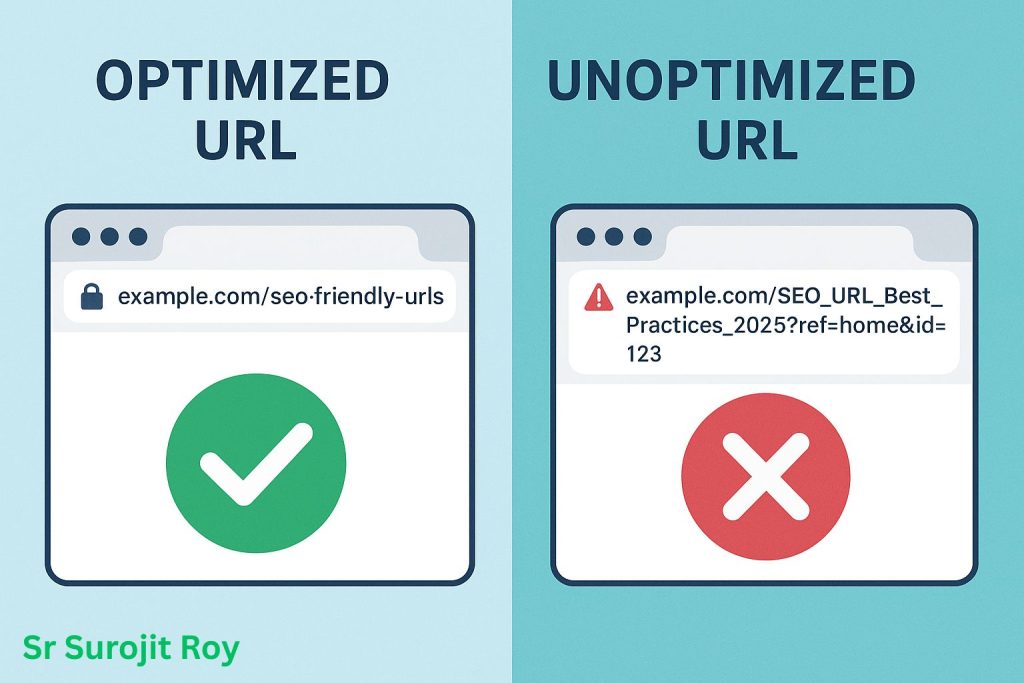
A messy URL is like giving someone the wrong directions you might reach the destination, but the journey is confusing. But, a well-structured URL (URL Optimization in SEO) is more than an internet address, it’s one of the simplest, most effective ways to boost your website’s SEO. Clear, descriptive URLs help search engines, answer engines, and AI platforms understand, build trust, increase click-through rates and rank your content accurately.
1. Which URL Is Best for SEO?
Think of your website’s URLs as the digital address for each page. A clean, clear address gets people—and Google—to the right place quickly. A messy one creates confusion and mistrust.
Getting your URLs right is one of the easiest wins in SEO. From my experience helping businesses grow, a strong URL strategy is a foundation for everything else. Let’s break down exactly how to do it.
| Best Practices | Pitfalls to Avoid |
| Short, descriptive slugs | Overly long, unclear URLs |
| Relevant keyword inclusion | Keyword stuffing |
| Secure protocol (HTTPS) | Unsecured (HTTP) |
| Logical hierarchy and folder use | Deep/subfolder bloat |
| Hyphen separation | Underscores or spaces |
| Consistent structure across site | Mixed styles |
| 301 redirects for changes | Broken links/no redirects |
| Canonicalization for duplicates | Multiple pages competing |
| No tracking codes in main paths | Exposed UTM in core URLs |
| Branded short URLs for campaigns | Generic, vendor-based links |
Make Your URL a Clear, Honest Promise to URL Optimization in SEO
At its core, a URL should promise what the page delivers. This involves three simple ideas that work together:
- Focus on the User’s Goal (Search Intent): Before you write anythng, ask: what does my visitor want? Are they looking to buy something (“transactional”), learn something (“informational”), or find a specific page (“navigational”)? Your URL Optimization in SEO should reflect that goal.
- Bad: /page-id-554 (Tells the user nothing)
- Good: /how-to-choose-a-camera (Promises a guide)
- Good: /shop/nikon-z6-camera (Promises a product page)
- Use Descriptive Keywords (Not a List): Your URL should contain the main keyword for the page. This tells Google and users exactly what to expect. Keep it focused on 1-2 main keywords that perfectly match your page title.
- Title: The Best Local SEO Services in Dhaka
- Weak URL: /services/seo-marketing-dhaka-bangladesh-local-search (Keyword stuffing; looks like spam)
- Strong URL: /local-seo-services-dhaka (Clear, concise, and trustworthy)
At Sr Surojit Roy, the first question I ask a client is, “What is the primary goal of this page?” The URL must be the shortest, clearest answer to that question.
- Build a Logical Path (Hierarchy): Just like folders on a computer, your URLs should show a clear path from a broad category to a specific page. This helps both users and search engines understand your site’s structure.
- Good Hierarchy: yoursite.com/services/seo/seo-audit
- Confusing Hierarchy: yoursite.com/seo-audit-service-page
2. The Simple Rules for a Clean URL
Once you know what your URL should say, follow these rules to keep it clean and effective.
- Keep It Short: Remove “stop words” like a, an, the, for, and, etc. They add length without adding value.
- Before: /a-guide-for-the-best-seo-tools
- After: /best-seo-tools-guide
- Avoid Dates: Unless you’re a news site, never put a date in your URL (like /blog/2024/my-post). A URL with “2024” in it will look outdated in 2025, even if the content is still relevant. An “evergreen” URL without a date will always feel fresh.
- My Advice: From a technical standpoint, always use lowercase letters and hyphens (-) to separate words. Underscores (_) can confuse search engines, and uppercase letters can sometimes cause duplicate content issues. Hyphens are the universal standard.
3. The Golden Rule for URL Optimization in SEO: Always Use Forwarding When Changing URLs
What happens if you need to change a URL? This is a critical moment.
Changing a URL is like your business moving to a new physical address. If you just leave, all your old mail (and customers) will get lost. You must leave a forwarding address.
In SEO, this “forwarding address” is called a 301 redirect.
If you change a URL, you must set up a permanent 301 redirect from the old address to the new one. This tells Google and users’ browsers, “We’ve moved! Here is the new location.” This process transfers your hard-earned rankings and authority to the new URL.
From my experience, failing to do this is one of the most damaging (and common) self-inflicted SEO mistakes a business can make. Before you change any URL, make sure you have a plan to redirect it properly. It’s non-negotiable for long-term success.
What is a URL in SEO? Deep Dive and Practical Meaning
A URL as the street address for a page on your website. It’s the full link you see in your browser’s address bar. For your customers and for Google, that address is often the very first clue about what your page offers.
A clean, clear address builds trust and helps people find you. A messy, confusing one does the opposite.
In my experience auditing hundreds of websites, I’ve found that URLs are one of the most overlooked yet powerful parts of SEO. Getting them right is a simple fix that builds a strong foundation for everything else.
How People and Search Engines Evaluate URL Optimization in SEO
Both humans and search engines like Google use URLs as signposts. They are looking for context and clarity.
Imagine you’re shopping online. Which of these links would you rather click?
- www.greatshop.com/prod/view?id=881&cat=office
- www.greatshop.com/office-furniture/ergonomic-chairs
The second one, right? It’s descriptive and trustworthy. You know exactly what you’re getting before you even click.
Google thinks the same way. The second URL instantly tells it the page’s topic (“ergonomic chairs”) and its category (“office furniture”). This helps Google rank your page for the right searches, putting you in front of the right customers.
My Quick Checklist for a Healthy URL
When I audit a site, I ask three simple questions about its URLs. You can use this same checklist for your own pages:
- Is it descriptive? Does the URL clearly state what the page is about? A URL like /blog/how-to-improve-google-rankings is far better than /blog/post-123.
- Is it clean and focused? Is it free of random numbers, symbols (?, =, &), or unnecessary “stop words” (a, the, for)? Brevity is key. /waterproof-bluetooth-speaker is perfect.
- Is it logical? For larger sites, does the URL show a clear path? For example, /services/local-seo/ tells you it’s a specific page within the “services” category.
Fixing Messy URLs: Practical Steps for Better URL Optimization in SEO
Many businesses have websites with “dynamic” URLs that look like this:
yoursite.com/blog?id=4587&sort=date
This is a common issue with content management systems. That URL tells a user or a search engine nothing. The fix is to transform it into a “static” and descriptive URL.
The Transformed URL: yoursite.com/blog/2024-seo-trends
Here is the simple, practical process I use to help clients clean up their site structure:
- Audit and Identify: First, make a list of all your weak, messy URLs.
- Create New, Clean URLs: For each messy URL, create a new, descriptive one that follows the rules above.
- Implement 301 Redirects (The Crucial Step): This is the most important part. You must create a permanent 301 redirect that forwards the old URL to the new one. This is like setting up a “mail forwarding” service with the post office. It tells Google that the page has permanently moved and passes all the old page’s authority and ranking power to the new one.
- Update Your Links: Finally, update any internal links on your website to point to the new, clean URLs.
Fixing your URLs isn’t just a technical task; it’s about improving user experience and building trust. It’s a foundational step that signals to both humans and AI that your website is professional, organized, and authoritative.
What is the 80/20 Rule for SEO? Here’s Why Your URLs Matter Most
SEO can feel overwhelming. There are hundreds of “best practices” to follow, and it’s easy to get lost trying to do everything at once. This is where the 80/20 rule (also known as the Pareto Principle) becomes your most powerful tool.
The rule is simple: roughly 80% of your results will come from just 20% of your efforts.
The secret to effective SEO isn’t doing everything; it’s identifying and relentlessly focusing on that “vital 20%.” From my experience helping countless businesses grow their traffic, I can tell you that fixing your website’s URL structure is firmly in that critical group.
Why Effective URL Optimization in SEO Has a Huge Impact
Your URL is often the first thing a user or a search engine sees. It’s your digital first impression.
A messy, confusing URL creates friction and doubt. Think about it:
- Messy URL: yoursite.com/products?id=45&cat=shoe&ref=12
- Clean URL: yoursite.com/products/mens-blue-suede-shoes
The messy URL tells you nothing and looks unprofessional. The clean one is descriptive, trustworthy, and easy to understand.
Messy URLs are a major source of SEO problems. They confuse search engines about what a page is about, hurt user trust, and are difficult to share. By simply cleaning them up, you solve a foundational issue that impacts nearly every other aspect of your SEO.
Where to Focus Your Energy for the Biggest Wins
If you have limited time and resources, don’t try to fix every URL on a 1,000-page website at once. Apply the 80/20 rule again and start with the pages that matter most:
- Your Homepage
- Your Main Product or Service Pages
- Your Top 5-10 Most Visited Blog Posts or Articles
Fixing just these few critical URLs often delivers the majority of your potential gains.
Real-World Proof: A 40% Traffic Increase from URLs Alone
Let me give you a clear example. I recently worked with a client whose blog was filled with hundreds of auto-generated URLs like /posts?id=4537. They were getting traffic, but their growth had stalled.
We didn’t change their content, build new links, or redesign their site. We focused on one thing: a strategic URL cleanup. We mapped every old, messy URL to a new, clean, descriptive one (e.g., /blog/advanced-seo-tips) and implemented permanent redirects.
The result? A 40% increase in their organic traffic in under three months.
This is a perfect example of the 80/20 rule in action. By fixing one core problem, we unlocked significant growth. If you’re looking for the highest-impact first step in your SEO journey, start with your URLs. It’s the smartest move you can make.
What Are the 4 Parts of a URL? Explained in Easy Terms
1. Protocol (http / https)
- What it is: The protocol tells browsers how to communicate with the website.
- Why it matters: HTTPS secures data with encryption. Google prefers it—sites using HTTPS get a mild boost in rankings.
- Real impact: Visitors look for the padlock symbol for trust, especially on sites with payments or personal data. If your site isn’t HTTPS, users may leave and Google may lower your ranking.
2. Domain Name
- What it is: Your brand’s web address (like greatbrand.com).
- Why it matters: A memorable, short, relevant domain helps your branding and is easier to share.
- SEO tip: Use your brand or main business focus, but don’t stuff keywords. Shorter domains perform better for user recall and trust.
3. Path, Slug, Folders
- What it is: Everything after the domain, showing what page you’re on—for example, /services/local-seo-audit.
- Why it matters: The path organizes content into categories or sections. Search engines use this to understand your site’s structure and page topics.
- Real impact: Clear, relevant paths like /blog/seo-guide rank better than confusing ones like /page?id=123. They enhance both SEO and user experience.
4. Parameters / Query Strings
- What it is: Extra information used for searching, sorting, or tracking, typically after a ?, like /search?query=laptop.
- Why it matters: Good for filters or tracking, but can hurt SEO if overused—may cause duplicate content or indexing issues.
- SEO tip: Use parameters only when necessary; keep your main SEO pages parameter-free when possible.
Bonus: Anchor (#section)
- What it is: Anything after a #, such as /blog/seo-basics#tips.
- Why it matters: Anchors help users jump to sections of a page but do not impact SEO rankings.
- Expert note: Useful for navigation and user experience, not for search optimization.
Best Practice
- Keep folder structure shallow (avoid deep nesting).
- Use only hyphens (-) to separate words; avoid underscores, spaces, or special characters.
- Keep everything concise, focused, and relevant.
A well-structured URL, using HTTPS, a memorable domain, logical paths, and minimal parameters, is fundamental for SEO. It improves indexing, user trust, and sharing. As {{IDENTITY}}, I recommend auditing your URLs regularly and applying these best practices for stronger search results and a better user experience.
Do URLs Affect SEO? Beyond Basics
1. Direct SEO Factors
- Crawlability: If your URL is clear and simple (not cluttered with random numbers or tracking codes), Googlebot can find and understand your pages faster, helping them show up in search results.
- Keyword Signaling: Using relevant keywords in the URL path (like /seo-strategies) shows Google what your page is about, making it more likely to rank for those terms.
- SERP Appearance: Users are more likely to click on clean, straightforward URLs in search results. Messy or confusing URLs look less trustworthy and get fewer clicks.
2. Indirect SEO Effects
- User Experience: Clear URLs help users understand where they are and what a page is about, making them less likely to leave quickly (which reduces bounce rates).
- Social Sharing: People prefer to share URLs that are easy to read and remember. Readable URLs attract more social shares, leading to more backlinks and referral visits.
- Link Earning: Other websites are more comfortable linking to professional-looking URLs, which helps you earn valuable links from industry partners.
Current Google Thinking
- Google’s technology now understands topics and context really well, but structured, descriptive URLs are still important. They help Google match your pages to what users are looking for.
Real Data & Experience
On large e-commerce sites, removing session IDs and tracking codes from URLs fixed indexing problems and led to better search rankings—12 new products hit page one in just a month. Clean URLs directly improve SEO results.
Using clear, simple, and keyword-relevant URLs helps both Google and users. It supports better ranking, gets more clicks, is shared and linked to more often, and leads to real improvements in traffic and sales.
The Three Types of URLs and Their SEO Impact
1. Absolute URLs
- What they are: These URLs include everything—protocol (http/https), domain, and page path (e.g., https://www.shop.com/products/chair).
- SEO Impact:
- Best choice for linking across different websites (cross-site).
- Essential for clearly marking which page is “the one” you want indexed (canonicalization).
- Reduces confusion for Google; keeps things consistent.
- When to use: Always use for canonical tags, sitemaps, and when linking between different domains.
2. Relative URLs
- What they are: Only the part after the domain (e.g., /products/chair).
- SEO Impact:
- Good for internal links within the same site because they’re shorter.
- However, on large sites or during migrations, they can create confusion or broken links.
- When to use: Use with care for internal linking, but avoid for canonicals and complicated site structures.
3. Canonical URL Optimization in SEO
- What they are: These tell Google which version of a page you want to be treated as the main or official one.
- SEO Impact:
- Crucial for sites with similar or duplicate content, such as different product sorts or print views.
- Prevents ranking loss by consolidating page authority to the preferred page.
- How to use: Add <link rel=”canonical”> in your HTML to specify the master version.
- Real Experience:
- Mistakes (like mixing up www and non-www versions, or setting canonicals wrong) can tank your rankings.
- Fixing canonical issues reliably restores lost visibility and trust.
Advanced: Dynamic URLs
- What they are: URLs that include parameters for sorting or filtering (e.g., /products/?sort=price&color=blue).
- SEO Risks:
- Can create lots of duplicate pages (every filter combo = new URL).
- How to Fix:
- Use canonical tags to point all variants back to the main page.
- Block unimportant versions from being indexed using robots.txt or meta “noindex”.
The three URL types each play a unique role in SEO. Use absolute URL Optimization in SEO for clarity and consistency, apply canonicals rigorously to manage duplicates, and handle dynamics carefully to avoid flooding search engines with low-value, duplicate content. Real-world experience shows mistakes here can cause big ranking losses—but getting URLs right protects your SEO and your site’s visibility.
What is a Good URL Example? More Practical Tips
Clear Examples
- Product: /products/waterproof-bluetooth-speaker
- Blog: /blog/google-ranking-tips-2026
- Local Service: /london/event-photography
Checklist for Evaluation
- Does the URL reflect page content?
- Keywords match search intent?
- No extra numbers, symbols or irrelevant words?
- Organized by topic/category for larger sites.
Transforming Weak URLs
Original:
/blog?id=4587&sort=date
Transformed:
/blog/seo-trends-2026
Process for Existing Sites:
- List all URLs.
- Group by content type.
- Create new slugs matching real topics.
- Redirect old URLs.
- Update internal and external links.
Internal Link Optimization
Consistent, keyword-relevant URLs within internal navigation gives search engines more context and improves site crawlability.
Creating and Optimizing Short URLs for Stronger SEO Results
Purpose and Power
Short URLs get higher click-through rates and are easier to remember/share. For campaigns—social, print, email—a readable address boosts brand and engagement.
Balancing Relevance and Brevity
Don’t over-shorten.
/a34fs9 is short but meaningless.
/blue-widget-sale is both short and topical.
Creation Steps
- Identify the main topic or call to action.
- Choose the root (homepage, product, landing page).
- Add the descriptive keyword or event.
- Avoid dates unless needed for time-sensitive content.
Tools
- Bitly & Rebrandly: Custom branded, trackable short URLs.
- YOURLS: Self-hosted shortener for advanced tracking.
- Use Google’s Campaign URL Builder for UTM tracking without visible clutter.
Implementation Tips
- Always redirect short URLs to HTTPS.
- Set up branded short domains for campaigns.
Example: brand.ly/seo-tips
Sr Surojit Roy’s Using:
- Use branded short URLs for every customer-facing campaign.
- Measure engagement via click reports.
- Encourage staff, influencers, and partners to amplify using clean short addresses.
8. Tracking Clicks on URLs—Advanced Methods
Why It Matters
Tracking allows you to measure what works, optimize campaigns, and deeply understand visitor preferences.
Analytics + UTM Parameters
UTM tags add campaign info (source, medium, term) to URLs.
Example: /seo-services?utm_source=newsletter&utm_medium=email
How to Set Up:
- Use Google’s URL builder to generate URL Optimization in SEO tracking links.
- Ensure UTM tags don’t replace your main URLs—redirect if needed.
- Monitor traffic to each tracked from within Google Analytics (Acquisition > Campaigns).
Other Tracking Tools
- Bitly/Rebrandly: Track clicks and geographic breakdown for every short link.
- Matomo: Advanced analytics with privacy controls.
- Server Logs: Deeper analysis for enterprise sites.
Integration with CRM
Push click data into CRM (like Salesforce, Hubspot) for sales attribution, lead scoring, and nurture campaigns.
Best Practice Reminders
- Don’t use UTM or tracking codes for core navigation URLs.
- Always test links before launching major email or ad campaigns.
Troubleshooting Tracking Issues
- If clicks aren’t recorded, verify the URL is live and accessible.
- Ensure redirects are mapped correctly.
- For cross-domain tracking, use Google Analytics’ advanced settings.
URLs and Branding: Trust, Reputation, and E-E-A-T Signals
Building Trust
- Always use HTTPS and renew certificates promptly.
- Avoid unrelated words, numbers, or symbols in public-facing URLs.
Authority Through URL Consistency
- Match URL style across products, brands, and local sites.
- Use canonicalization for international or duplicate content.
Branding Strategies
- Reserve core URL slugs for signature offerings (e.g. /consulting, /solutions)
- Leverage branded short URLs in all outbound communication.
E-E-A-T Alignment
Google’s E-E-A-T (Experience, Expertise, Authority, Trust) values clear, branded, and relevant URLs. Every clean URL reinforces your site’s authority and reliability in both user perception and crawler algorithms.
Sr Surojit Roy’s Authority Insight on URL Optimization in SEO
His proven frameworks always recommend URL Optimization in SEO as a cornerstone of “digital trust”—especially for B2B sites, health, finance, and education, where credibility is paramount.
Advanced Problem Solving
Common Business Owner Mistakes
- Allowing CMS or shopping platforms to auto-generate “ugly” URLs
- Permitting non-secure (HTTP) links
- Neglecting canonical tags, thereby creating SEO cannibalization
Fixing Legacy URLs
- Inventory all URLs with Screaming Frog or Google Search Console.
- Map and redirect each old URL to its improved version using 301 (permanent) redirects.
- Resubmit your sitemap after changes to prompt Google indexing.
- Audit for broken links post-migration, using tools like Ahrefs or SEMrush.
Changing URLs: Preserving Rankings
- Maintain all inbound links with proper redirects.
- Notify Google via Search Console’s “Change of Address.”
- Communicate updates to major partners and customers, requesting link updates when possible.
SEO for Multilingual or Multi-Region Sites
- Use country codes in folder structure: /es/servicios-seo for Spain, /mx/servicios-seo for Mexico.
- Specify canonical versions across international domains.
Latest Trends
- Google and AI engines now analyze “entity relationships”—group related content under logical, keyword-rich folders.
- Rich results: Structured slugs (matching schema/data) increase odds for answer engines and featured snippets.
- Voice search optimization: URLs with natural language improve matching with voice queries.
Advanced Troubleshooting
- Use Google’s URL Inspection Tool to diagnose indexing or crawl issues.
- “Site:” search on Google to inventory visible URLs.
- For JavaScript-heavy sites: Pre-render pages to ensure clean, crawlable URLs.
13. Reference List
- Google SEO Starter Guide
- Sr Surojit Roy’s SEO Research
- Moz URL Guidelines
- Ahrefs SEO Tools
- Matomo & Bitly Analytics
- Search Engine Journalist: URL Optimization
Real-world:
Mistaken canonicals and inconsistent www/non-www URLs cause major ranking losses. Fixing them restores visibility and trust.